Friday, 16 May 2025

Make international calls cheaper and right from your browser - Voixcall.com is here


Voixcall.com


VoixCall is a browser-based international calling service that launched on May 6, 2025, offering high-quality voice calls to any phone number worldwide without requiring downloads or subscriptions, and operating on a simple pay-as-you-go credit system(Product Hunt). Users simply sign up with an email address, add credits in their preferred currency, and dial directly from the web interface, benefiting from WebRTC-powered, end-to-end encrypted connections that work in any modern browser(voixcall.com, voixcall.com).

How It Works

VoixCall leverages industry-standard WebRTC technology to transmit voice data directly from your browser to the public telephone network, eliminating the need for downloads or plugins(voixcall.com, VoiceSpin). Once you’ve created an account, you add credits and enter any international number; VoixCall’s global SIP backbone then routes your call with HD-grade audio and minimal latency(voixcall.com). Because everything runs in-browser, there’s no software installation, no background services, and no risk of VoIP ports being blocked by carriers or firewalls(Medium).

Key Features

  • Global Reach: Call any country without restrictions—landlines, mobile phones, government or institutional numbers alike(voixcall.com).

  • Credit-Based Billing: Only pay for the minutes you use; credits never expire and there are no recurring charges or contracts(voixcall.com).

  • No Downloads or Installs: Works in Chrome, Firefox, Safari, Edge, and other modern browsers—no desktop or mobile app required(voixcall.com).

  • Flexible Currency Support: Choose from multiple currencies (USD, INR, EUR, etc.) and see real-time exchange rates when adding credits(voixcall.com).

  • Secure & Private: All calls are encrypted end-to-end, and VoixCall does not share call metadata with third parties beyond telecom providers and payment processors(voixcall.com).

Pricing Options

VoixCall’s pricing is fully transparent and varies by destination and duration:

  • Per-minute rate: From $0.02/minute (e.g., calls to major destinations start as low as $0.02/min) up to $0.10 total per call for short connections(voixcall.com).

  • Credit Packages: Purchase credits in increments of your choice—add exactly what you need, with no minimums and no hidden fees(voixcall.com).

  • Currency Selection: Pay in USD, INR, EUR, and other supported currencies, with live exchange-rate calculations shown at purchase time(voixcall.com).

Policies & Support

  • Refund Policy: Eligible requests are reviewed within five business days; approval depends on the nature of the issue and supporting documentation(voixcall.com).

  • Terms of Service: Users agree to a credit-based usage model and acknowledge that call quality may vary based on internet conditions and destination networks(voixcall.com).

  • Customer Assistance: For questions or technical support, VoixCall offers email support via the “Contact” page on their site(voixcall.com).

Launch & Availability

VoixCall officially went live on May 6, 2025, positioning itself as a seamless alternative to traditional VoIP apps by removing installation barriers and subscription commitments(Product Hunt). The service is accessible globally, provided only that you have a modern web browser and internet access.

Getting Started

  1. Sign Up: Visit the VoixCall signup page and register with your email address—no phone verification required(voixcall.com).

  2. Add Credits: Select your preferred currency and credit amount; payments accepted via credit/debit cards or PayPal(voixcall.com).

  3. Place a Call: Enter any international phone number into the dialer and click “Call”—enjoy HD voice quality instantly(voixcall.com).

Why Choose VoixCall?

  • Simplicity: No apps, downloads, or complicated setups—call from any device with a browser.

  • Cost-Efficiency: Transparent, usage-based pricing ensures you never pay for minutes you don’t use.

  • Universal Compatibility: Works across operating systems and networks without special configuration.

  • Security & Privacy: Encrypted calls and minimal metadata retention for your peace of mind.


Start making international calls today without the hassle of apps or subscriptions—Sign Up Free on VoixCall and pay only for the minutes you use.

Monday, 7 July 2014

Critical Vulnerability and Privacy LoopHole Found in RoboForm Password Manager

Critical Vulnerability and Privacy LoopHole Found in RoboForm Password Manager Unless you are a human supercomputer, remembering password is not so easy, and that too if you have a different password for each site. But luckily to make the whole process very easy, there is a growing market out there for password managers and lockers with extra layers of security.

But, if you are using the mobile version of most popular password manager from Password management company RoboForm to manage your passwords then you might be at a risk, claimed a UK based Security researcher.

I am personally using RoboForm from last few months, which is a great password manager application developed by Siber Systems Inc. for various platforms that stores your sensitive data all in one place, protected at RoboForm account and encrypted by a secret master password. RoboForm user be able to then quickly access those passwords and notes anytime, anywhere.

But a IT security consultant and tech enthusiast Paul Moore discovered one critical vulnerability in its app and one Privacy loophole in the RoboForm's service, that could allow attackers and prying eyes to get users’ personal data, including stored login credentials of various websites and payment card details.

Note: Yesterday we published this article with a conclusion that RoboForm is secure, but later after re-evaluating and discussing all factors, attack vectors with Moore, we found that RoboForm may leak your private data to attackers.

1) BYPASSING ROBOFORM DEVICE PIN PROTECTION
Critical Vulnerability and Privacy LoopHole Found in RoboForm Password Manager
The vulnerability disclosed by Paul Moore in the security of RoboForm affects its Android and iOS app users, which could allow anyone to bypass RoboForm’s PIN Protection in order to access users’ sensitive data.

RoboForm mobile apps offer a PIN protection which only protects the app interface from unauthorized access, just like Android’s popular ‘AppLock’ application.

Moore claimed that simply by deleting a specific line (pref_pincode) in the RoboForm’s preferences file placed in a folder on the device file system, It was possible for Moore to access confidential data and bypass authentication process on an Android device, even without the requirement of the Master Password, as shown in the Video demonstration uploaded by him.
The important point to be noted here is that the RoboForm’s app folder which Moore claims to access is actually placed in root directory of the device, which can’t be accessed by the user or any 3rd party app on a non-rooted device.

miniLock - Open Source File Encryption Tool from CryptoCat Developer

miniLock - Open Source File Encryption Program from CryptoCat Developer
It’s the age of surveillance what made the Use of Encryption so widely that it has become a need of law enforcement agencies, cyber criminals as well as every individual. But, encryption is not so easy.

To solve this problem, a 23-year old Cryptocat developer Nadim Kobeissi is ready to release a simple solution to deliver strong encryption at the HOPE hacker conference in New York later this month, which may soon come as an extension for Google Chrome web browser, Wired reported.

The encryption program is dubbed as miniLock, which is a free and open-source browser plugin designed to let anyone encrypt and decrypt files in seconds using a drag-and-drop interface with practically unbreakable cryptographic protection.
The tagline is that this is file encryption that does more with less,” says Kobeissi, activist and security consultant. “It’s super simple, approachable, and it’s almost impossible to be confused using it.

Sunday, 30 March 2014

A BEGINNERS GUIDE TO HACKING UNIX


*************  *       A BEGINNERS GUIDE TO:        *  *          H A C K I N G             *  *                                    *  *                U N I X             *  *                                    *  *       *  * **


   IN THE FOLLOWING FILE, ALL REFERENCES  MADE TO THE NAME UNIX, MAY ALSO BE  SUBSTITUTED TO THE XENIX OPERATING  SYSTEM.    BRIEF HISTORY:  BACK IN THE EARLY  SIXTIES, DURING THE DEVELOPMENT OF  THIRD GENERATION COMPUTERS AT MIT,  A GROUP OF PROGRAMMERS STUDYING THE  POTENTIAL OF COMPUTERS, DISCOVERED  THEIR ABILITY OF PERFORMING TWO OR  MORE TASKS SIMULTANEOUSLY.  BELL  LABS, TAKING NOTICE OF THIS DISCOVERY,  PROVIDED FUNDS FOR THEIR DEVELOPMENTAL  SCIENTISTS TO INVESTIGATE INTO THIS  NEW FRONTIER.  AFTER ABOUT 2 YEARS OF  DEVELOPMENTAL RESEARCH, THEY PRODUCED  AN OPERATING SYSTEM THEY CANLMD "UNIX".    SIXTIES TO CURRENT:  DURING THIS TIME  BELL SYSTEMS INSTALLED THE UNIX SYSTEM  TO PROVIDE THEIR COMPUTER OPERATORS  WITH THE ABILITY TO MULTITASK SO THAT  THEY COULD BECOME MORE PRODUCTIVE,  AND EFFICIENT.  ONE OF THE SYSTEMS THEY PUT ON THE UNIX SYSTEM WAS CALLED  "ELMOS". THROUGH ELMOS MANY TASKS (I.E. BILLING,AND INSTALLATION RECORDS) COULD  BE DONE BY MANY PEOPLE USING THE SAME  MAINFRAME.    NOTE: COSMOS IS ACCESSED THROUGH THE  ELMOS SYSTEM.    CURRENT:  TODAY, WITH THE DEVELOPMENT  OF MICRO COMPUTERS, SUCH MULTITASKING  CAN BE ACHIEVED BY A SCALED DOWN  VERSION OF UNIX (BUT JUST AS  POWERFUL).  MICROSOFT,SEEING THIS  DEVELOPMENT, OPTED TO DEVELOP THEIR OWN  UNIX LIKE SYSTEM FOR THE IBM LINE OF  PC/XT'S.  THEIR RESULT THEY CALLED  XENIX (PRONOUNCED ZEE-NICKS).  BOTH  UNIX AND XENIX CAN BE EASILY INSTALLED
ON IBM PC'S AND OFFER THE SAME FUNCTION
(JUST 2 DIFFERENT VENDORS).

NOTE: DUE TO THE MANY DIFFERENT
VERSIONS OF UNIX (BERKLEY UNIX,
BELL SYSTEM III, AND SYSTEM V
THE MOST POPULAR) MANY COMMANDS
FOLLOWING MAY/MAY NOT WORK. I HAVE
WRITTEN THEM IN SYSTEM V ROUTINES.
UNIX/XENIX OPERATING SYSTEMS WILL
BE CONSIDERED IDENTICAL SYSTEMS BELOW.

HOW TO TELL IF/IF NOT YOU ARE ON A
UNIX SYSTEM:  UNIX SYSTEMS ARE QUITE
COMMON SYSTEMS ACROSS THE COUNTRY.
THEIR SECURITY APPEARS AS SUCH:

LOGIN;     (OR LOGIN;)
PASSWORD:

WHEN HACKING ON A UNIX SYSTEM IT IS
BEST TO USE LOWERCASE BECAUSE THE UNIX
SYSTEM COMMANDS ARE ALL DONE IN LOWER-
CASE.
LOGIN; IS A 1-8 CHARACTER FIELD. IT IS
USUALLY THE NAME (I.E. JOE OR FRED)
OF THE USER, OR INITIALS (I.E. J.JONES
OR F.WILSON).  HINTS FOR LOGIN NAMES
CAN BE FOUND TRASHING THE LOCATION OF
THE DIAL-UP (USE YOUR CN/A TO FIND
WHERE THE COMPUTER IS).
PASSWORD: IS A 1-8 CHARACTER PASSWORD
ASSIGNED BY THE SYSOP OR CHOSEN BY THE
USER.
      COMMON DEFAULT LOGINS
   --------------------------
   LOGIN;         PASSWORD:
   ROOT           ROOT,SYSTEM,ETC..
   SYS               SYS,SYSTEM
   DAEMON     DAEMON
   UUCP           UUCP
   TTY              TTY
   TEST            TEST
   UNIX           UNIX
   BIN              BIN
   ADM            ADM
   WHO           WHO
   LEARN        LEARN
   UUHOST     UUHOST
   NUUCP        NUUCP

Tuesday, 25 March 2014

CASH! CASH! Hacking ATM Machines with Just a Text Message

Hacking ATM Machines for Cash with Just a Text Message
As we reported earlier, Microsoft will stop supporting the Windows XP operating system after 8th April, apparently 95% of the world’s 3 million ATM machines are run on it. Microsoft's decision to withdraw support for Windows XP poses critical security threat to the economic infrastructure worldwide.

MORE REASONS TO UPGRADE
Security researchers at Antivirus firm Symantec claimed that hackers can exploit a weakness in Windows XP based ATMs, that allow them to withdraw cash simply by sending an SMS to compromised ATMs.

"What was interesting about this variant of Ploutus was that it allowed cybercriminals to simply send an SMS to the compromised ATM, then walk up and collect the dispensed cash. It may seem incredible, but this technique is being used in a number of places across the world at this time." researchers said.

HARDWIRED Malware for ATMs
According to researchers - In 2013, they detected a malware named Backdoor.Ploutus, installed on ATMs in Mexico, which is designed to rob a certain type of standalone ATM with just the text messages.

Microsoft Word Zero-Day Vulnerability is being exploited in the Wild

Microsoft Word Zero-Day Vulnerability is being exploited in the Wild
Microsoft warned about a zero-day vulnerability in Microsoft Word that is being actively exploited in targeted attacks and discovered by the Google security team. “At this time, we are aware of limited, targeted attacks directed at Microsoft Word 2010…” company said.

According to Microsoft's security advisory, Microsoft Word is vulnerable to  a remote code execution vulnerability (CVE-2014-1761) that can be exploited by a specially crafted Rich Text Format (RTF).

An Attacker can simply infect the victim's system with malware if a user opens a malicious Rich Text Format (RTF), or merely preview the message in Microsoft Outlook.

Snoopy Drone Can Hack Your Smartphones

Snoopy Drone Can Hack Your Smartphone to Steal Passwords The use of unmanned aerial vehicles (UAVS) called Drones is rapidly transforming the way we go to war. Drones were once used for land surveillance, Delivering Pizza's, then equipped with bombs that changed the way nations conduct war and now these hovering drones are ready to hack your Smartphones.

London-based Sensepoint security researchers have developed a drone called 'Snoopy' that can intercept data from your Smartphones using spoofed wireless networks, CNN Money reported.

The Drone will search for WiFi enabled devices and then using its built-in technology, it will see what networks the phones have accessed in the past and pretends to be one of those old network connections.

Spoofing WiFi networks that device has already accessed allows Snoopy Drone to connect with targeted Smartphone without authentication or interaction. In technical terms, The Drone will use 'Wireless Evil Twin Attack' to hack Smartphones.

Android Privilege Escalation Flaws leave Billions of Devices vulnerable to Malware Infection

Android Privilege Escalation Flaws leave Billions of Devices vulnerable to Malware Infection Android - a widely used Smartphone platform offered by Google is once again suspected to affect its users with malicious software that puts their android devices at risk. This time the vulnerabilities occur in the way Android handle the updates to add new flavors to your device.

Researchers from Indiana University and Microsoft have discovered [Paper PDF] a new set of Android vulnerabilities that is capable to carry out privilege escalation attacks because of the weakness in its Package Management Service (PMS) that puts more than one billion Android devices at risk.

The researchers dubbed the new set of security-critical vulnerabilities as Pileup flaws which is a short for privilege escalation through updating, that waylays inside the Android PMS and intensifies the permissions offered to malicious apps whenever an android update occurs, without informing users.

Friday, 20 December 2013

Introduction to Netcat


Netcat-Logo-black-500x250px.gif


Introduction : So I was messing around on the internet and came across a tool called Netcat.  I've been messing with it for a couple of days and it's some pretty cool stuff. It's really good for reverse tcp attacks as well. Anyways, let's talk about this tool.

It's called Netcat! Also known as, "The tcp/ip swiss army knife" from many sources
DOWNLOAD LINK :NETCAT

You can enter this tool in two way by typing
Code:
nc

or
Code:
netcat
Anyways here's a description of this cool little tool.


Monday, 2 December 2013

Google Nexus phone vulnerable to SMS-based DOS attack

Google Nexus phones vulnerable to SMS-based DOS attack
Google’s Nexus Smartphones are vulnerable to SMS-based DOS attack, where an attacker can force it to restart, freeze, or lose network connection by sending a large number of special SMS messages to them.

The vulnerability, discovered by Bogdan Alecu, a system administrator at Dutch IT services company Levi9, and affects all Android 4.x firmware versions on Google Galaxy Nexus, Nexus 4 and Nexus 5.
The problem is with how the phones handle a special type of text message, known as a flash SMS. By sending around 30 Flash SMS (Flash SMS is a type of message that normally is not stored by the system and does not trigger any audio alerts) messages to Nexus phone an attacker can cause the phone to malfunction.

He presented the vulnerability on Friday at the DefCamp security conference in Bucharest, Romania. In an email exchange with me, he said 'I was testing different message types and for the class 0 messages I noticed that the popup being displayed also adds an extra layer which makes the background darker." 

"Then my first thought was: what happens if I send more such messages? Will it make the entire background go black? If so, wouldn't this cause a memory leak? The answer is "Yes" for both of the questions. So, basically, by sending around 30 Class 0 messages, it will make the Google device behave strangely'."
According to the researcher, several possible outcomes can result from the overloading:

Linux worm targeting Routers, Set-top boxes and Security Cameras with PHP-CGI Vulnerability

Linux worm targeting Routers, Set-top boxes and Security Cameras with PHP vulnerability
A Symantec researcher has discovered a new Linux worm, targeting machine-to-machine devices, and exploits a PHP vulnerability (CVE-2012-1823) to propagate that has been patched as far back as May 2012.
Linux worm, which has been dubbed Linux.Darlloz, poses a threat to devices such as home routers and set-top boxes, Security Cameras, and even industrial control systems. It is based on proof-of-concept code released in late October and it helps spread malware by exploiting a vulnerability in php-cgi.

"Upon execution, the worm generates IP addresses randomly, accesses a specific path on the machine with well-known ID and passwords, and sends HTTP POST requests, which exploit the vulnerability. If the target is unpatched, it downloads the worm from a malicious server and starts searching for its next target." the Symantec researchers explained.

The malware does not appear to perform any malicious activity other than silently spreading itself and wiping a load of system files.

10 reasons why PCs crash U must Know


10 reasons why PCs crash U must Know

Fatal error: the system has become unstable or is busy," it says. "Enter to return to Windows or press Control-Alt-Delete to restart your computer. If you do this you will lose any unsaved information in all open applications."

You have just been struck by the Blue Screen of Death. Anyone who uses Mcft Windows will be familiar with this. What can you do? More importantly, how can you prevent it happening?

1 Hardware conflict


The number one reason why Windows crashes is hardware conflict. Each hardware device communicates to other devices through an interrupt request channel (IRQ). These are supposed to be unique for each device.

For example, a printer usually connects internally on IRQ 7. The keyboard usually uses IRQ 1 and the floppy disk drive IRQ 6. Each device will try to hog a single IRQ for itself.

If there are a lot of devices, or if they are not installed properly, two of them may end up sharing the same IRQ number. When the user tries to use both devices at the same time, a crash can happen. The way to check if your computer has a hardware conflict is through the following route:

* Start-Settings-Control Panel-System-Device Manager.

Often if a device has a problem a yellow '!' appears next to its description in the Device Manager. Highlight Computer (in the Device Manager) and press Properties to see the IRQ numbers used by your computer. If the IRQ number appears twice, two devices may be using it.

Sometimes a device might share an IRQ with something described as 'IRQ holder for PCI steering'. This can be ignored. The best way to fix this problem is to remove the problem device and reinstall it.

Sometimes you may have to find more recent drivers on the internet to make the device function properly. A good resource is www.driverguide.com. If the device is a soundcard, or a modem, it can often be fixed by moving it to a different slot on the motherboard (be careful about opening your computer, as you may void the warranty).

When working inside a computer you should switch it off, unplug the mains lead and touch an unpainted metal surface to discharge any static electricity.

To be fair to Mcft, the problem with IRQ numbers is not of its making. It is a legacy problem going back to the first PC designs using the IBM 8086 chip. Initially there were only eight IRQs. Today there are 16 IRQs in a PC. It is easy to run out of them. There are plans to increase the number of IRQs in future designs.

2 Bad Ram


Ram (random-access memory) problems might bring on the blue screen of death with a message saying Fatal Exception Error. A fatal error indicates a serious hardware problem. Sometimes it may mean a part is damaged and will need replacing.

But a fatal error caused by Ram might be caused by a mismatch of chips. For example, mixing 70-nanosecond (70ns) Ram with 60ns Ram will usually force the computer to run all the Ram at the slower speed. This will often crash the machine if the Ram is overworked.

One way around this problem is to enter the BIOS settings and increase the wait state of the Ram. This can make it more stable. Another way to troubleshoot a suspected Ram problem is to rearrange the Ram chips on the motherboard, or take some of them out. Then try to repeat the circumstances that caused the crash. When handling Ram try not to touch the gold connections, as they can be easily damaged.

Parity error messages also refer to Ram. Modern Ram chips are either parity (ECC) or non parity (non-ECC). It is best not to mix the two types, as this can be a cause of trouble.

EMM386 error messages refer to memory problems but may not be connected to bad Ram. This may be due to free memory problems often linked to old Dos-based programmes.

3 BIOS settings

Every motherboard is supplied with a range of chipset settings that are decided in the factory. A common way to access these settings is to press the F2 or delete button during the first few seconds of a boot-up.

Once inside the BIOS, great care should be taken. It is a good idea to write down on a piece of paper all the settings that appear on the screen. That way, if you change something and the computer becomes more unstable, you will know what settings to revert to.

A common BIOS error concerns the CAS latency. This refers to the Ram. Older EDO (extended data out) Ram has a CAS latency of 3. Newer SDRam has a CAS latency of 2. Setting the wrong figure can cause the Ram to lock up and freeze the computer's display.

Mcft Windows is better at allocating IRQ numbers than any BIOS. If possible set the IRQ numbers to Auto in the BIOS. This will allow Windows to allocate the IRQ numbers (make sure the BIOS setting for Plug and Play OS is switched to 'yes' to allow Windows to do this.).

Saturday, 30 November 2013

How to restore DLL files on your computer


DLL or Dynamic Link Library files are very important part of programs and applications. So important are these files that the programs and applications will not run without them. Quite frequently it so happens that the Windows users encounter problems because of these DLL files. Although quite annoying, DLL repair is quite easy as long as you know how to do it.
Some of the most frequently occurring DLL file errors are run.dll, shell32.dll, system32.dllwmp.dll, kernell32.dll, rundll32.dll, xvid.dll, iframe.dll, kernel.dll and many more. These DLL files are mostly removed unintentionally. This generally happens while uninstalling a program; it may also so happen that there might be an occurrence of error because of any virus infecting the computer system. One need not worry when such a thing occurs as there are many ways in which this error can be repaired.

The problems and solutions

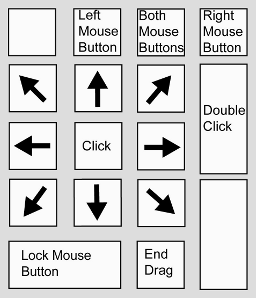
how to use your keyboard as a mouse


Hey Friends Today we will see how to Use A keyboard as Mouse, Yes you read it right, also i am not joking.
Its a very cool trick which everyone will love to try for sure and it is very simple as well.
in a situation where your mouse is spoilt, not available or maybe you want to simply impress your friends, you can use your keyboard as a mouse.it is a very simple method and you can access your keyboard like a mouse.
To do this just press
Alt+Left shift key+num lock

How to navigate everything with your keyboard?


The keyboard is one of the most important components of your desktop or laptop. Even if your mouse is not working, you can still operate the computer and accomplish all the tasks through the keyboard shortcuts. Also, the keyboard shortcuts help in improving your productivity as more amount of work can be done in less time. So if you are familiar with the keyboard functions, it will be very easy to perform the work even without the mouse or when it’s not working.

Let us explore more about the keyboard functions.
How to open a desktop program?
To open or run any program on the desktop, you can perform the following steps.
Step 1 – Press the Tab key to control the desktop icons
Step 2 – The Tab key will help you to select the desktop icons, anything from the taskbar and Start button
Step 3 – Once you are on the desktop, you can also use the arrow keys to move from one icon to another.
Step4 – Press Enter key when the icon is highlighted to Run the selected program.
Step 5- Sometimes the Tab key has to be pressed several times to navigate through desktop programs

How to root and install custom ROMs in android phones?

android-root-620x465
The trend of installing custom ROM’s and apps has brought a big revolution with many users trying to root their mobile devices to accomplish it. Rooting is a very sensitive task which should be done properly or else the device may lose its initial configuration and may result in malfunction of your gadgets. If you are fond of custom apps and ROM’s and what to integrate the same in your Android devices, you will have to first root your devices and then install the custom ROM’s.

Here is the step by step process to root and install the custom ROM’s in your Android phones.
Rooting your Android phones
Though every device has its own rooting process, but here we will discuss the general procedure to root the handsets which will work for all types of models.
Step 1 – In order to get started with rooting, dial *#*#2846579#*#* and you will be directed to the internal application which is used by the manufacturer. Here you can find out the different hardware’s installed on your device and can access the internal statistics as well.
Step 2 – Now look for Background Settings and then go to Log Settings
Step 3 – From the Log Settings menu, search Log Switch and enable it
Step 4 – Go to Settings and enable the USB debugging option as well
Step 5 –Install SuperClickOne app on your device and connect it to your desktop
Step 6 – Now extract the files from the zipped folder and run the exe file
Step 7 – On the top right corner, you will get find the option Root. Follow the steps and complete the rooting process
Step 8 – Restart your phone to confirm the changes

How to Remove Windows 7 Genuine notification


Not able to remove genuine Windows 7 successfully from your computer or laptop? Well then your problem is solved. The following few steps are quite easy and they will help you to very conveniently remove genuine Windows 7 from your PC. Many versions of Windows 8 are already in the market then why stay stuck with Windows 7. Even if you want to load some older version of Windows in your PC then also the following steps will help you out to successfully remove Windows 7 from your PC. The steps are very clear and precise.

The steps for removing Windows 7 Genuine from your PC are as follows:
  • Step 1: The first step is to pressing the Windows Key present on the left hand side of the keyboard. You can also simply click on the start button. Either way the start menu will appear once you do one of the above mentioned two things.
  • Step 2: Once the start option shows up go to the run option. Click on the run option. When you click on the run option, the run window will appear.
  • Step 3: Once the run window appears after clicking on the run option, you have to type “cmd” in it.CMD is the command to open the command prompt window. After typing cmd in the run window press enter and the command prompt window will open.

TIME Magazine Twitter account hacked by Syrian Electronic Army

TIME magazine Twitter account hacked by Syrian Electronic Army Just now, The hacktivist group Syrian Electronic Army (SEA) briefly took over the Twitter account of the TIME Magazine.
The Hacker group tweeted from the TIME's official account, "Syrian Electronic Army Was Here via @Official_SEA16..Next time write a better word about the Syrian president #SEA" with their logo, as shown above.

TIME Magazine is currently hosting polls for Who Should Be TIME’s Person of the Year? and on their website the Syrian President Bashar al-Assad is described as, "Syria’s ruler presided over a bloody year, shrugging off international concerns over the use of chemical weapons as the death toll of his country’s civil war eclipsed 100,000."

Warning: "A new message from Skype Voicemail Service" spam leads to Zeus Malware

Skype spam leads to Zeus Malware
Skype has been targeted by cyber criminals again this week. Users are receiving a new Spam Email with subject “You received a new message from the Skype voice mail service.”, that actually leads to Zeus Malware.
Zeus is a Trojan horse that attempts to steal confidential information from the compromised computer. It specifically targets system information, online credentials, and banking details, but can be customized through the toolkit to gather any sort of information.

CVE-2013-5065: Microsoft Windows XP and Server 2003 Privilege escalation Zero-Day exploit discovered

Researchers at FireEye have discovered a new privilege escalation vulnerability in Windows XP and Windows Server 2003.

CVE-2013-5065, Local privilege escalation vulnerability is used in-the-wild in conjunction with an Adobe Reader exploit (CVE-2013-3346) that appears to target a patched vulnerability.
Microsoft has issued an advisory and warned that discovered bug in Windows XP's NDPROXY.SYS driver could allow hackers to run code in the system's kernel from a standard user account.

The exploit could allow a standard user account to execute code in the kernel, which may allow an attacker to gain privileges that would enable him to do various activities, including deleting or viewing data, installing programs, or creating accounts with administrative privileges.